Understanding the business in general
- Go through COM's main website - we're the Market Leader division:
- https://commarketing.com.au/market-leader/
- (watch all the client case studies at the bottom)
Understand business offerings
- Basic walkthrough
- At COM, currently we offer the following offerings
- Organic content
- Social media posts + short videos - post it all channels (Instagram, Facebook, Tiktok, Linkedin)
- Ads
- Write Emails
- Write blog posts
- Organic content
- At COM, currently we offer the following offerings
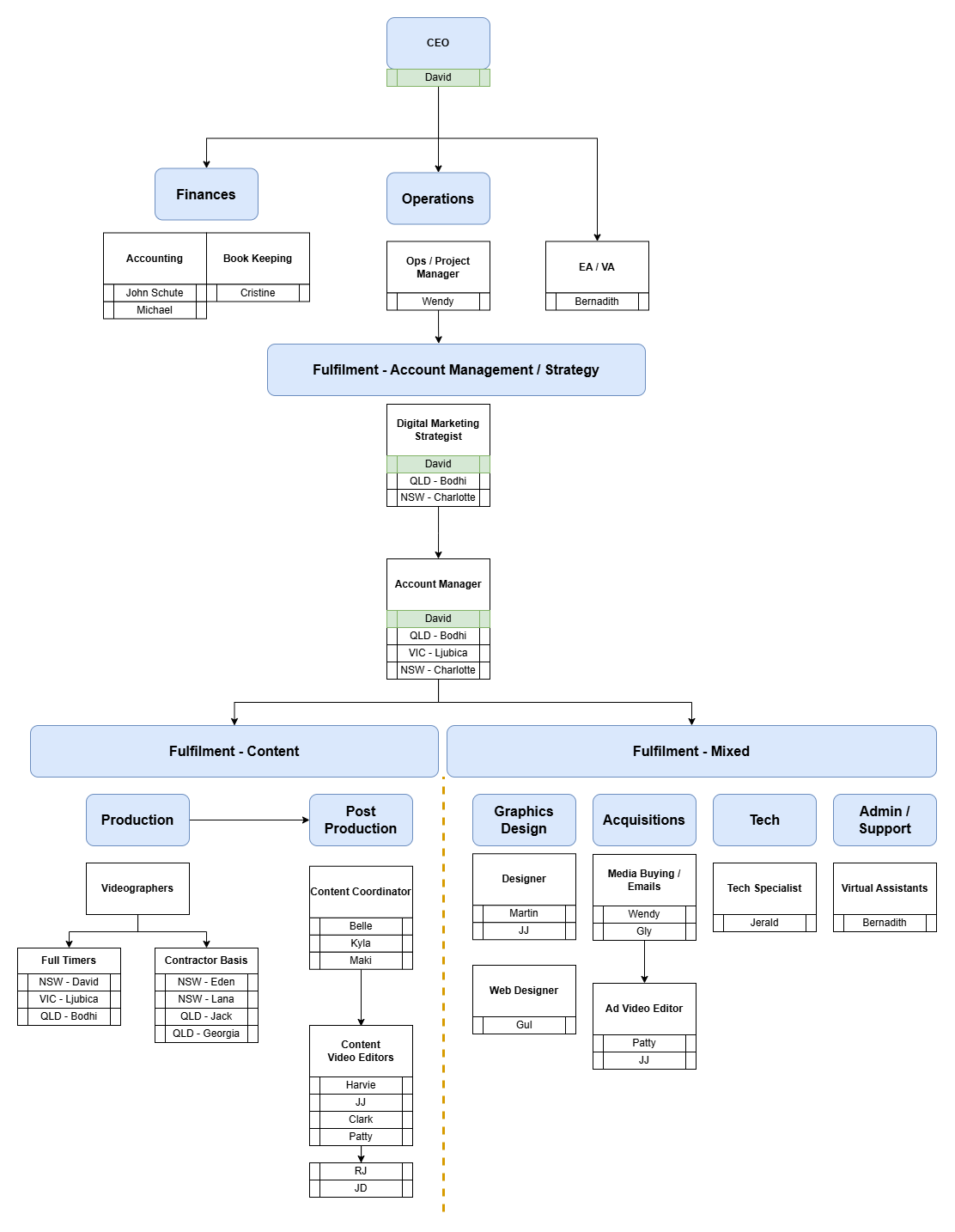
Understand team
- Read the Org Chart (click the image to expand)
Understanding Internal processes
- Team meetings
- Check out the Meeting Rhythm page → Meeting Rhythm
- Slack
- Everyone uses slack atm
- Slack is using a free plan atm
- Google Drive
- Client files and SOPs are inside the shared drive - navigation should be pretty self explanatory
- Dropbox
- LINK
- This is where we store all of our client assets (images/videos) - and what we use to edit videos and images
- Bitwarden
- Check out → Bitwarden + 2FA
- This is our password storing app used to log into tools we use
- Key documents Used
- Client master Sheet
- DOC
- Contains all the clients relevant documents that needs to be found for each client
- Content planners, social links, client passwords, SOP docs
- Shows which client is doing which services (content, ads, emails, blogs)
- Tells you which team member is responsible for which client
- Client master Sheet
Understanding fulfilment processes
- Clickup
- Currently, all projects are managed via Slack and Clickup
- Clickup manages all monthly client content flow and tasks that the team goes through
- Watch this loom explanation to get an understanding 👇
- Key documents used by the Content Team
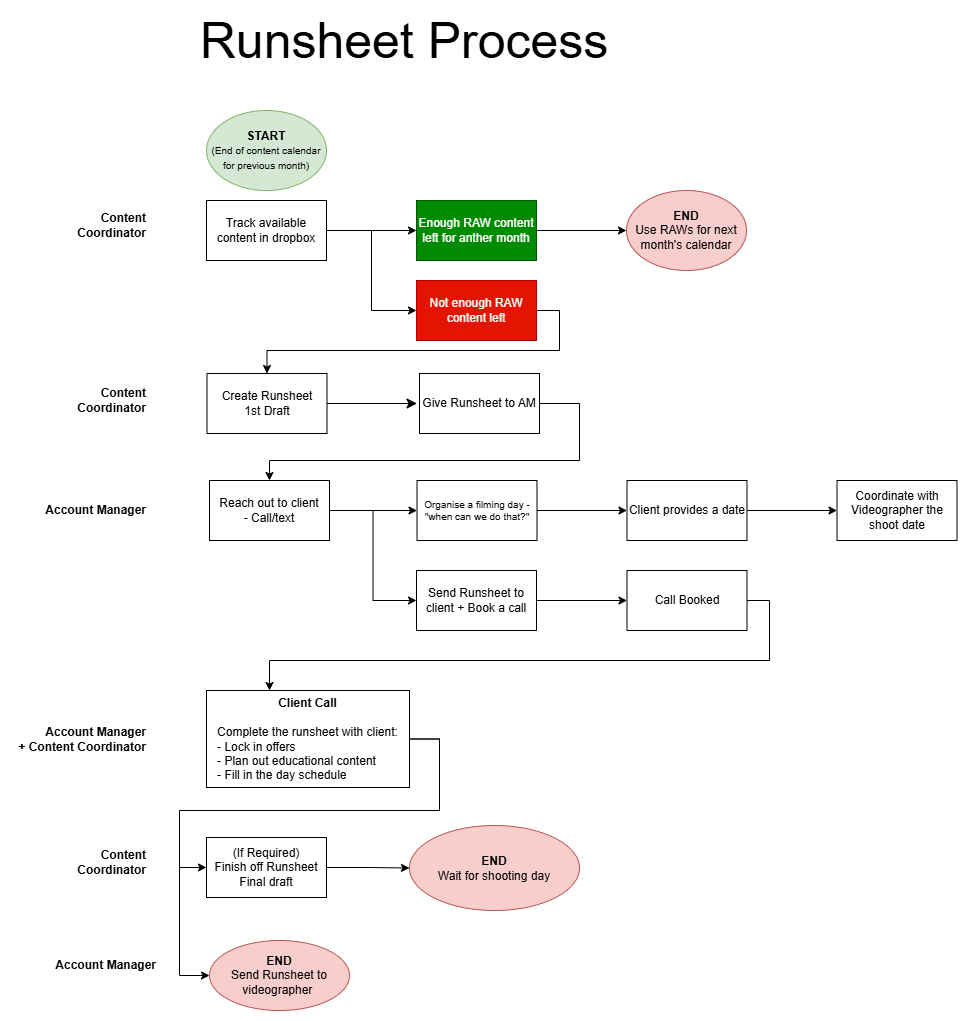
- Runsheet
- Template - Video Runsheet Template
- Filled out version example - BFP - Video Runsheet example
- A Runsheet:
- It's a document used by Account Manager/Coordinator used to coordinate with the client what a video shooting day should look like
- It should contain what type of content is there
- The Videographer then looks at to know on the day of the shoot - who and where and when to shoot throughout the day
- It's a document used by Account Manager/Coordinator used to coordinate with the client what a video shooting day should look like
- Template - Video Runsheet Template
- Content Planner
- Example - BFP - CONTENT PLANNER
- Every client uses the content planner every month to plan out all the content we'll be creating for them. This includes
- Social media posts (including videos)
- Emails we write for them
- Ads we make for them
- Our video editors use this to find videos to create
- Content Checker
- Market Leader Content Checker
- A log to check if all our content is posted everyday
- Used by Raenny - after scheduled posts are posted everyday, Raenny checks that everything has been posted properly (as sometimes the scheduler doesn't work, and/or we need to manually post for the client)
- Runsheet
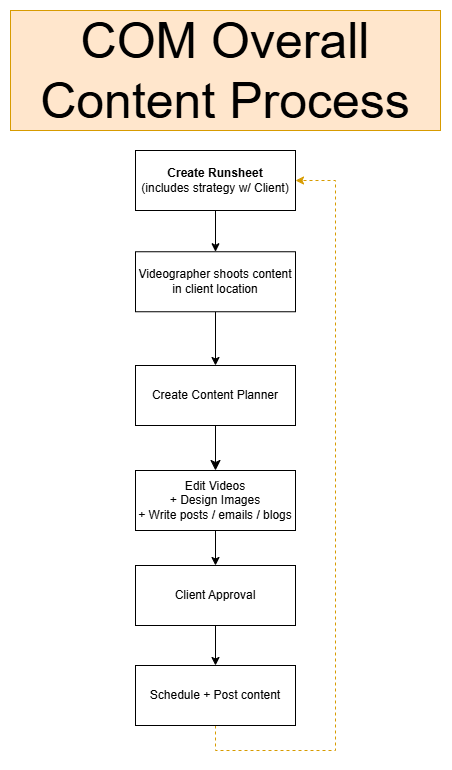
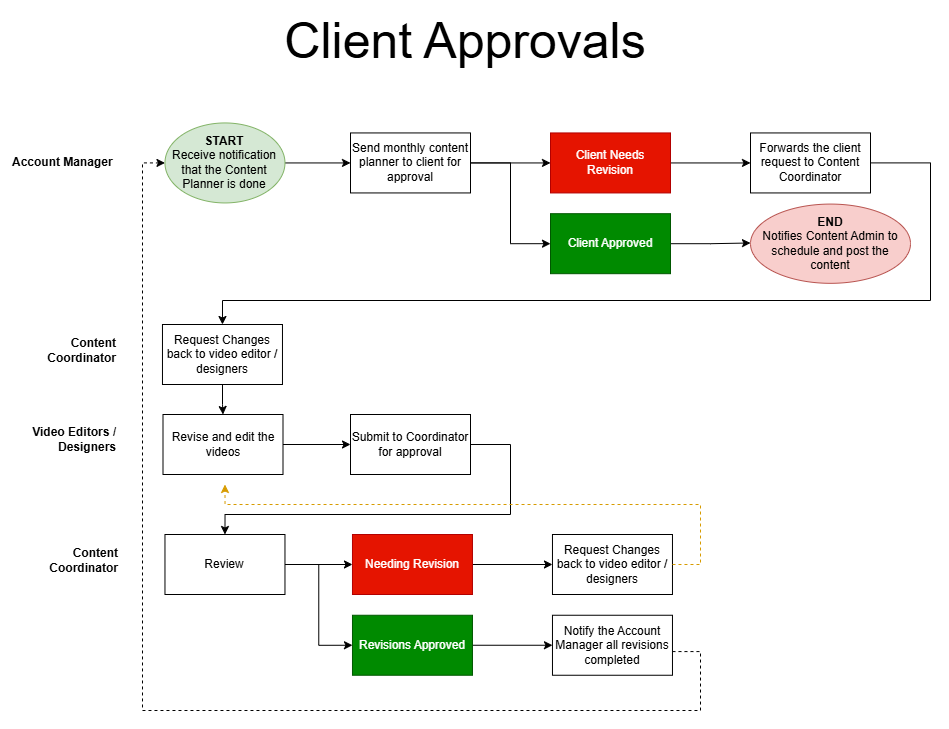
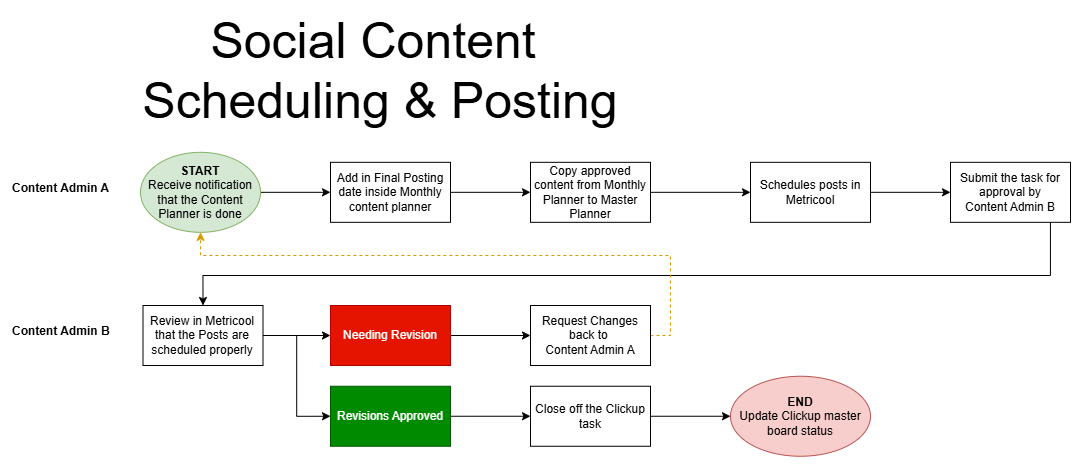
- Check out our process flowcharts (diagram)
- This is how COM's overall workflow looks like from the start of content production, to the end of content production
Overall Process
Runsheet Process
Videographer Production Day
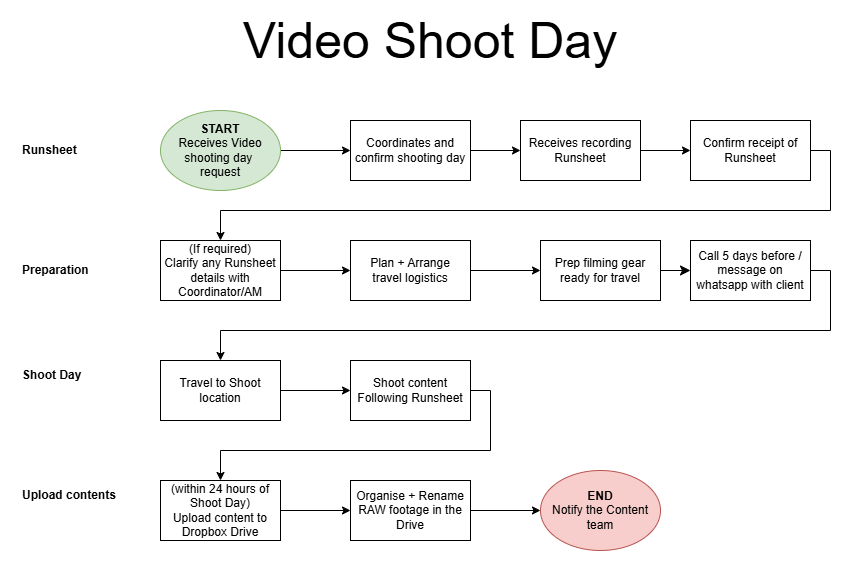
Content Planning
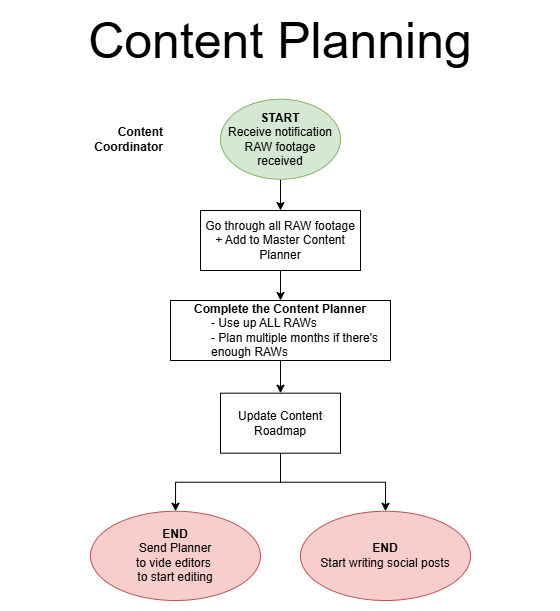
Social Media Post Writing
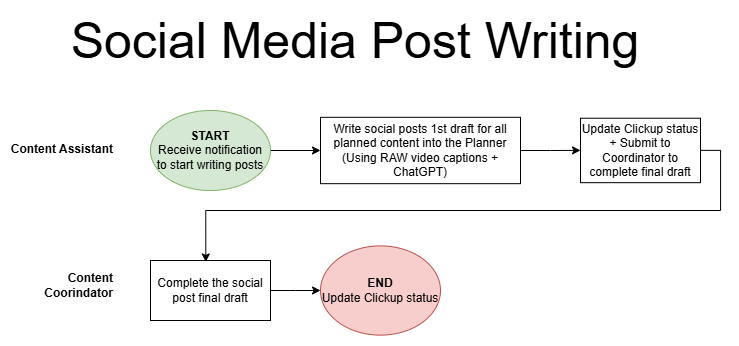
Video Editing
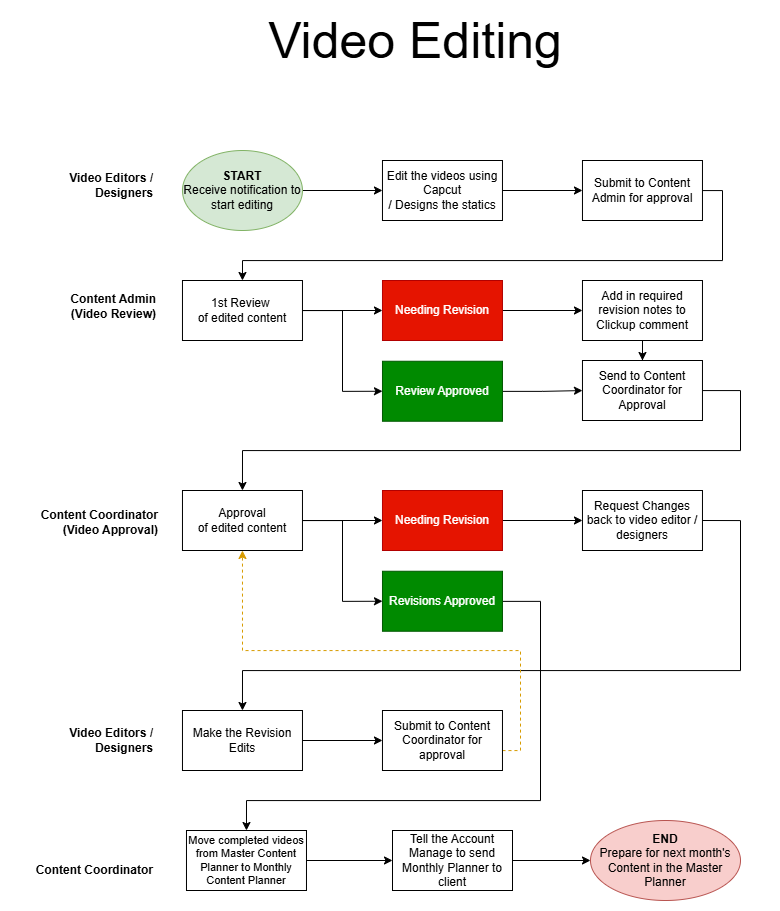
Client Approvals of Videos (after Editing)
Scheduling and posting the social media posts (after client approves)
Read The Handbook for Your Role / Department
Depending on what role you are hired for, please read the role/department that is relevant for you:
- Social Media Manager
- Go through (in Content Theories below)
- Long lead formula
- Fast and sticky lead emails
- Hero video
- 30x60 Stories
- Go through → HANDBOOK - Account Management
- Go through → HANDBOOK - Content Coordination
- Go through (in Content Theories below)
- Content Coordinator → HANDBOOK - Content Coordination
- Long lead formula, Hero video, Fast and sticky lead emails (in Content Theories below)
- Content Admins → HANDBOOK - Admin Assistants
- Video Editor → HANDBOOK - Video Editors
- Hero video (in Content Theories below)
- Video Editor Onboarding Meeting Recording
- Content Shooter → HANDBOOK - Videographer
Content Theories That We Follow
- Go through COM Ninja Program
- Module #1:
- Module 2:
- The Funnel Flow Tracker - VIDEO
- Understanding how their CRM works - pulls into the main lead tracker
- The Funnel Flow Tracker - VIDEO
- Module 3:
- The Long Lead Formula (Your Social Media Content Plan) - VIDEO
- Core module explaining how we do our content
- Some extra resources to check out:
- Click here to make a copy of The Long Lead Framework Doc
- Complete one round of the Long Lead Frameworks (this will give you 30 days of social media content)
- Use the ChatGPT Megaprompt to speed up the whole process.
- Fast Leads & Sticky Content (Email Marketing)
- The Long Lead Formula (Your Social Media Content Plan) - VIDEO
- Module 5:
- Online Paid Funnels
- Just check out the organic funnel part - what COM teaches people to do
- Online Paid Funnels
- Module 6: